
3. Configuring false positives in DataMapper - Admin (EN)
False positives are data incorrectly flagged as sensitive data. The goal is to minimize false positives to get more accurate data.
Why does this happen?
DataMapper looks for high-risk numbers, in order to classify a document as high risk. We scan for: passport numbers (multiple languages), NINO numbers (UK), driver's licenses (multiple languages), CPR numbers (multiple languages), and payment card information (credit card numbers). However, it can happen that similarly formatted numbers are flagged as, for example, a CPR number or passport number, where the document type can be decisive. It's most often in .XLS files that DataMapper is challenged on that parameter.
Risk documents that contain risk keywords - keywords for sensitive topics (e.g. health, trade union) or business-critical terms (e.g. contract, budget). The system flags keywords such as virus as sensitive data. If words like virus are used in a different context, e.g. an online virus targeting IT equipment, the document isn't actually one with sensitive data. However, the system may not understand the full context and often flags it as a risk document.
How can you minimize false positives?
One way to minimize false positives is by reviewing the findings made, especially for risk keywords. Here, context is what matters most in why we've flagged a document, and it's decisive for whether it was a correct finding or a false positive.
DataMapper is built on AI and Machine Learning models and won't be able to deliver 100%, but as close as possible, since we continuously train and develop the models - also with the help of your feedback.
As an administrator in DataMapper, you can influence which findings DataMapper makes by accessing: Risk settings > Select Country > Edit keywords
Be aware that keywords don't carry the same risk. For example, the word "patient" standing alone is a weaker signal (and lacks context) compared to, say, "patient" + name + diagnosis. Looking at the context in the findings DataMapper has made before making adjustments helps reduce noise and, going forward, false positives.
Also consider that words can have different meanings, so when reviewing "false positives" it's also important to look at the whole document and not just the words alone.
When reviewing files and keywords, this is what it might look like for you as an admin:

Click Preview or Go to document and review the file's content.
The preview is shown below:

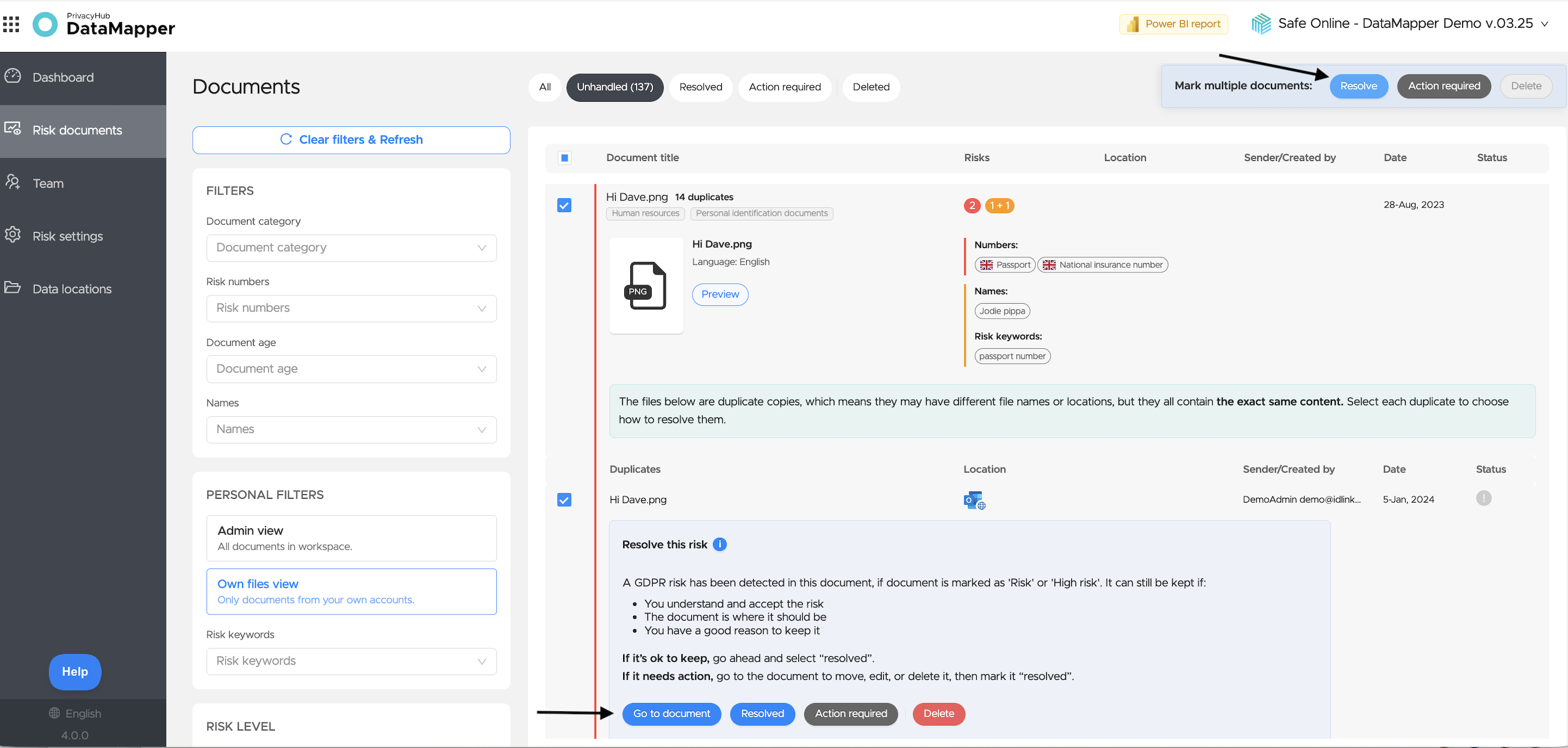
Then choose what should happen to the file; mark it as Resolved if the file is OK to keep or was a false positive. This way you also help DataMapper improve its understanding of your context.
Improving accuracy in high-risk findings
Although a lot can be achieved by adjusting keywords, etc., sometimes it's necessary to go a step further with more in-depth training on your specific documents.
At Safe Online, we understand that companies work with many different file types and formats across countries and languages. To improve the accuracy of identifying high-risk data and give you a better user experience, we offer a customized solution*.
Here's how the process works:
Step 1: Initial rule-based scanning
We start with an initial scan using our rule-based models. These models are designed to identify sensitive data by recognizing specific patterns and keywords, such as NINO numbers in the UK and CPR numbers in Denmark.
Step 2: Review and analysis
Once the initial scan is complete, we work with the customer to review the results. This step involves identifying any false positives (incorrectly flagged data) as well as sensitive data that may have been overlooked. This can also be done after you've reviewed the keywords yourselves and made adjustments, and documents still remain that add noise to your risk picture.
Step 3: Customized training with LLM
Based on data from the review in step 3, we perform further training of our Large Language Models (LLM) with the customer's specific data. This customized training helps the LLM better understand the context and reduce false positives in future scans.
Step 4: Re-scanning for improved accuracy
Once the LLM has been trained with the customer-specific data, we carry out a re-scan of the data. This ensures more accurate findings with significantly fewer false positives and any overlooked sensitive data from the first scan.
👌 Benefits of this process:
- Increased accuracy: Tailored scanning and training provide more precise identification of high-risk data.
- Reduced false positives: Improved LLM processing minimizes incorrect flags, saving time and resources going forward.
- Better user experience: More accurate results provide a smoother and more efficient data handling experience for the user.
- Continuous improvement: The system becomes more accurate over time, as more data is processed and the LLM is further trained.
By leveraging the power of DataMapper and our advanced AIM engine Safe Online ensures that your company's sensitive data is identified accurately and efficiently – with increased security and user satisfaction.
If you're interested in hearing more about the process for the customized solution, please reach out to our Success team to get pricing information, etc.
Do you have questions? You can write to us via the chat in DataMapper or send us an email support@safeonline.dk 😊